Use FLAGSTD to specify the level or subset of Standard COBOL 85 to be regarded as conforming, and to get informational messages about
Standard COBOL 85 elements that are included in your program.
You can specify any of the following items for flagging:
- A selected Federal Information Processing Standard (FIPS) COBOL subset
- Any of the optional modules
- Obsolete language elements
- Any combination of subset and optional modules
- Any combination of subset and obsolete elements
- IBM extensions (these are flagged any time that FLAGSTD is specified, and identified as "nonconforming nonstandard")
FLAGSTD option syntax
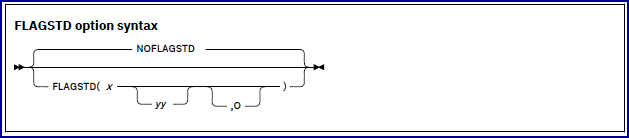
Default is: NOFLAGSTD
Abbreviations are: None
x specifies the subset of
Standard COBOL 85 to be regarded as conforming:
- M
- Language elements that are not from the minimum subset are to be flagged as "nonconforming standard."
- I
- Language elements that are not from the minimum or the intermediate subset are to be flagged as "nonconforming standard."
- H
- The high subset is being used and elements will not be flagged by subset.
Elements that are IBM extensions will be flagged as "nonconforming Standard, IBM extension."
yy specifies, by a single character or
combination of any two, the optional modules to be included in the subset:
- D
- Elements from debug module level 1 are not flagged as "nonconforming standard."
- N
- Elements from segmentation module level 1 are not flagged as "nonconforming standard."
- S
- Elements from segmentation module level 2 are not flagged as "nonconforming standard."
If S is specified, N is included
(N is a subset of S).
O specifies that obsolete language elements are flagged as "obsolete."
The informational messages appear in the source program listing, and identify:
- The element as "obsolete," "nonconforming standard," or "nonconforming nonstandard" (a language element that is both
obsolete and nonconforming is flagged as obsolete only)
- The clause, statement, or header that contains the element
- The source program line and beginning location of the clause, statement, or header that contains the element
- The subset or optional module to which the element belongs
FLAGSTD requires the standard set of reserved words.
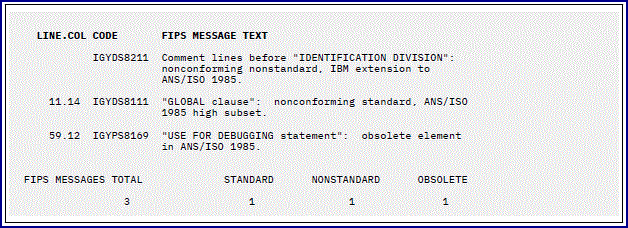
In the following example, the line number and column where a flagged clause, statement, or header occurred are shown, as well
as the message code and text.
At the bottom is a summary of the total of the flagged items and their type.
You can convert FIPS informational messages into diagnostic messages, and can suppress FIPS messages, by using the MSGEXIT suboption of the EXIT compiler option.
For details, see the related reference about the processing of MSGEXIT, and see the related task.
© Copyright IBM Corp.

