|
Writes data to a transient data queue.
Sintaxe:
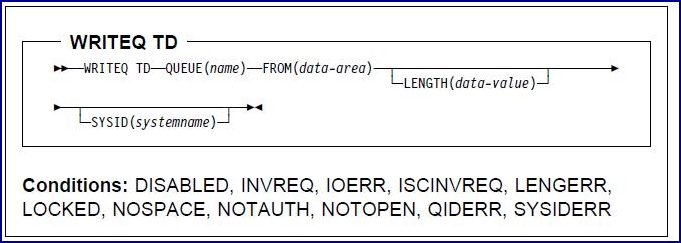
Descrição:
WRITEQ TD writes transient data to a predefined symbolic destination.
To be able to write to an extrapartition queue, you must set the IOMode attribute that is in the Transient Data
Definitions (TDD) entry to output.
The following example shows how to write data to a predefined symbolic destination, which in this case is the CICS
System Master Terminal (CSMT) log:
     EXEC CICS WRITEQ TD
          QUEUE('CSMT')
          FROM(MESSAGE)
          LENGTH(LENG)
     END-EXEC
Opções:
FROM(data-area)
- Specifies the data that is to be written to the transient data queue.
LENGTH(data-value)
- Specifies, as a 16-bit binary value, the length of the data that is to be written.
- LENGTH must be present:
- For intrapartition queues (C programs only).
- For extrapartition queues that do not contain fixed-length records.
- If SYSID is specified; the record size cannot be obtained from the TDD entry.
- LENGTH is optional.
- For extrapartition queues that contain fixed-length records.
- If LENGTH is present, it should match the value taht is given in the TDD entry for the queue.
- For remote queues when SYSID is not specified; the record size is defaulted from the TDD entry if LENGTH is not
supplied.
- See LENGTH for more information about using this option.
QUEUE(name)
- Specifies the symbolic name of the queue that is to be used.
- The name can be up to four characters long. If the SYSID option is not used to specify a remote SYSID, this queue
must have an entry in the Transient Data Definitions (TDD).
SYSID(name)
- Specifies on which CICS region the WRITEQ is to run.
- The SYSID name has one through four characters.
- For a full description of the SYSID option, refer to SYSID.
- If the SYSID option is not specified, it defaults to the value that is in the RemoteSysId attribute of the
TDD entry for the queue that is requested in the QUEUE option.
Condições:
DISABLED
- Occurs when the queue has been disabled.
- Ação pré-definida: Terminates the task abnormally.
IOERR
- Occurs if an I/O error occurs during the transient data operation.
- (See Processing the IOERR condition for information about handling the IOERR
condition.)
- IOERR can occur for recoverable intrapartition TD queues if the file server has been restarted while CICS is still
running.
- Ação pré-definida: Terminates the task abnormally.
ISCINVREQ
- Occurs if the remote system indicates a failure that does not correspond to a known condition.
- Ação pré-definida: Terminates the task abnormally.
LENGERR
- Occurs for the following conditions:
- WRITEQ TD names an extrapartition queue that contains fixed-length records and does not specify a length that
is consistent with the TDD entry.
- The LENGTH option is omitted for a WRITEQ TD operation that involves an intrapartition queue or an extrapartition
queue that does not contain fixed-length records.
- The LENGTH option specified a negative or zero value for the length of the data that is to be written.
- Ação pré-definida: Terminates the task abnormally.
NOSPACE
- Occurs if no more space exists in the file that is holding the queue data.
- When this happens, no more data should be written to the queue because it might be lost.
- Ação pré-definida: Terminates the task abnormally.
NOTAUTH
- Occurs for the following conditions:
- When a resource security check is unsuccessful on QUEUE(name)
- When SYSID is specified by a transaction that is defined with the RSLCheck attribute set to either
internal or external
- Ação pré-definida: Terminates the task abnormally.
NOTOPEN
- Occurs if the destination is closed. This condition applies to extrapartition queues only.
- Ação pré-definida: Terminates the task abnormally.
QIDERR
- Occurs if the symbolic destination that is to be used with a WRITEQ TD command cannot be found.
- Ação pré-definida: Terminates the task abnormally.
SYSIDERR
- Occurs if a problem with the communications configuration prevents the WRITEQ from proceeding.
For example:
- The connection that is named in the SYSID option is not the name of a Communications Definition (CD) entry.
- The SYSID option references a CD entry that is incorrectly configured.
- The SYSID option references a CD entry that is marked as out of service.
- It can also occur if the connection to the remote system is closed.
- This could be because the remote system is not available.
- Ação pré-definida: Terminates the task abnormally.
Informações relacionadas:
© Copyright IBM Corp.
|