Menu principal                 [Fechar]


CICS Manual do Usuário - DEQ


Volta a página anterior

Volta ao Menu Principal


Desenvolvido por DORNELLES Carlos Alberto - Analista de Sistemas - Brasília DF. - cad_cobol@hotmail.com

DEQ

Releases a currently enqueued resource for use by another task.

Sintaxe:
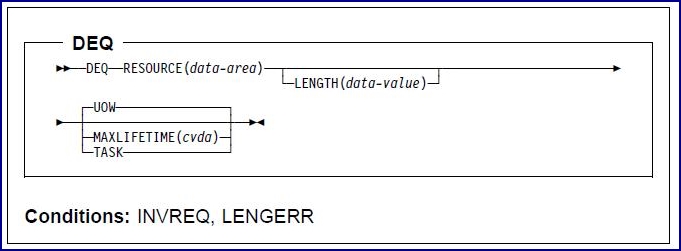
Descrição:

DEQ causes a resource that is currently enqueued by the task to be released for use by other tasks.

If a task enqueues on a resource but does not dequeue from it, CICS automatically releases the resource during syncpoint processing or when the task is terminated.
A resource in the context of this command is any string of 1 through 255 bytes, established by in-house standards to protect against conflicting actions between tasks.

When the DEQ command is issued, the resource that is to be released must be identified by the method that is used when enqueueing on the resource.
If no enqueue has been issued for the resource, the dequeue is ignored.

If more than one ENQ command is issued for a resource by a task, that resource remains owned by the task until the task issues a matching number of DEQ commands.

The following examples show how to dequeue from a resource:

    EXEC CICS 
         DEQ
         RESOURCE(RESNAME)
    END-EXEC

    EXEC CICS 
         DEQ
         RESOURCE(SOCSECNO)
         LENGTH(8)
    END-EXEC

Opções:

    LENGTH(data-value)
  • Specifies, as a 16-bit binary value, the length of the resource to be released.
  • The value must be in the range 1 through 255.
  • If you specify a value outside this range, a LENGERR condition occurs.
  • If the LENGTH option is specified in an ENQ command, it must also be specified in the DEQ command for that resource, and the values of these options must be the same.

  • This option is required if the resource is specified as a character string; it is not specified otherwise.
    RESOURCE(data-area)
  • Specifies either the resource hat is to be released, or a data area that contains a character string that represents the resource (for example, an employee name).
  • In the case of a data area, you must use the LENGTH option.
  • See LENGTH for more information about using this option.

Condições:

    LENGERR
  • Occurs if the LENGTH value is out of range.
  • Ação pré-definida: Terminates the task abnormally.

Informações relacionadas:


© Copyright IBM Corp.